
Nearly 1 in 10 Exposed LiteLLM Gateways Accepted the Example "sk-1234" Admin Key
Nearly 1 in 10 internet-facing LiteLLM gateways accepted the example "sk-1234" admin key straight from the setup guide. That one key can expose every stored model-provider API key and the cloud credentials behind the gateway. Here's what Wiz found, the four CVEs, and what to check on your own gateway today.
If you route AI through a LiteLLM proxy — the open-source gateway a lot of teams put in front of their model providers — there is a security story you should read today, and it’s not about a zero-day nobody can exploit. It’s about a default key that ships in the project’s own setup guide.
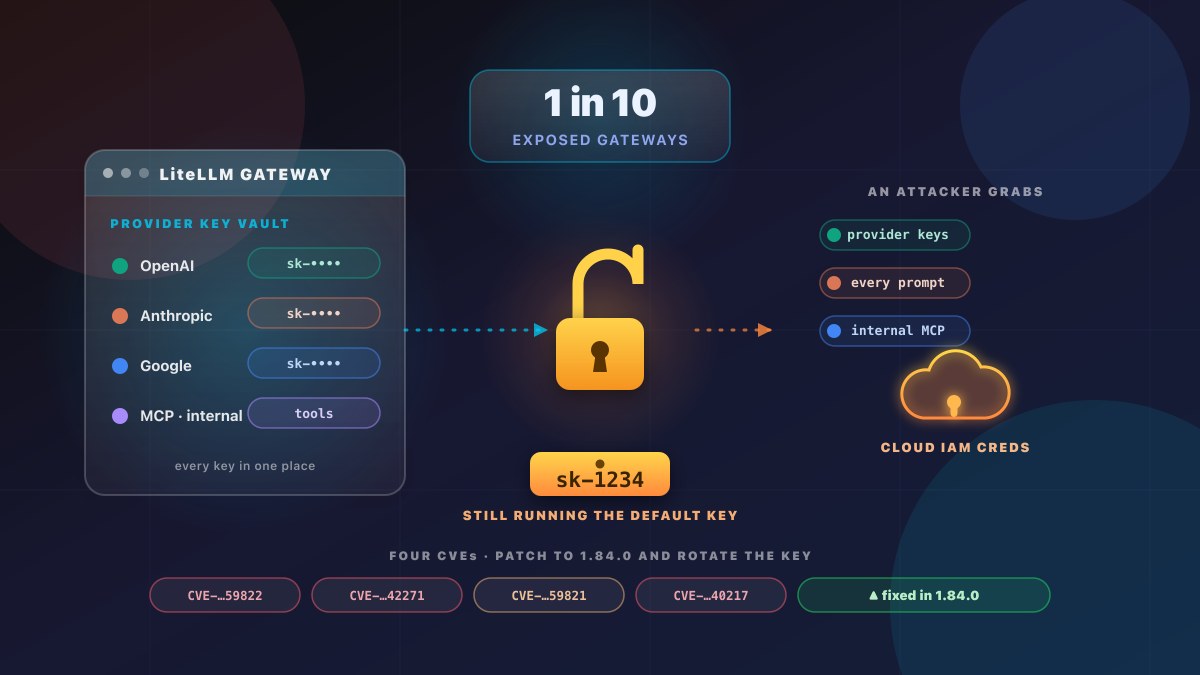
Security researchers at Wiz scanned the internet for LiteLLM gateways and tested them with the example admin key that appears in LiteLLM’s own configuration docs: sk-1234. The Hacker News reports the results, and Wiz’s primary research confirms them. Of 3,074 internet-facing gateways found, 294 — roughly 1 in 10 — accepted that key. In 191 of those, no key was set at all, so they would have accepted anything.
What was found
Wiz did not try to break into these systems with some novel trick. It held up the setup guide’s own example value and asked the gateway to authenticate. A gateway that accepts sk-1234 is, in practical terms, wide open to anyone who knows it is a LiteLLM box and knows what the default says.
The exposure is real and current. As of September 9, 2026, LiteLLM’s own setup guide still shows sk-1234, sitting just above a comment telling operators to replace it with a long random value before real use. The default is doing exactly what defaults do.
A second Wiz scan in August reported more than 85,000 LiteLLM instances. Wiz is careful to note most of those look like honeypots or test systems, so that number cannot be compared to the 3,074 figure — it is a different scan, a different population. Treat it as “this software is everywhere,” not “85,000 gateways are compromised.”
Source: Wiz research, Feb 2026. The 85,000+ August figure is a separate, non-comparable scan (mostly honeypots/test).
Why one key matters this much
The master key does two jobs at once, and that is what makes a default value dangerous. It is the admin credential and the switch that turns authentication on. Before version 1.82.0-stable, a gateway started with no master key granted every incoming request full admin rights.
What an admin on one of these servers can reach is more than most people expect. The gateway typically holds:
- An API key for every provider it routes to — OpenAI, Anthropic, Google, and anything else.
- Every prompt and reply passing through it, in the clear.
- MCP (Model Context Protocol) connections to the internal tools the operator wired up.
- The cloud permissions of the workload it runs in — because it is usually deployed with them.
Stolen provider keys alone let an attacker run model workloads on the victim’s bill — an abuse already known as LLMjacking.
How one key reaches your cloud account
This is the part that turns a bad default into a real incident. LiteLLM lets an administrator create a pass-through endpoint — a route that forwards requests to any URL the admin chooses. The target URL is not checked against private address ranges, localhost, or cloud metadata addresses.
An admin can therefore point a route at the cloud instance metadata service (IMDS) and read back the IAM credentials it returns. Switching to IMDSv2 does not stop it: LiteLLM documents that any header sent with an x-pass- prefix is forwarded to the target with the prefix stripped, and Wiz used that to send the headers IMDSv2 requires.
Be clear on what this is and isn’t. No source reports anyone doing this against a real deployment. It is a demonstration, and it requires admin access first — which is exactly what the sk-1234 default hands over. Wiz says the feature is arguably working as intended, because LiteLLM’s threat model treats administrators as trusted. It has no CVE and no fix.
The four CVEs — and one disputed severity
Four flaws are tracked. Three are straightforward and rated high; the fourth is where the researchers and the maintainers disagree.
| CVE | What it allows | Affected versions | Fixed in |
|---|---|---|---|
| CVE-2026-59822 | MCP authentication bypass — an authenticated MCP session from any Bearer token reaches the configured MCP tools | Before 1.84.0 | 1.84.0 |
| CVE-2026-42271 | Command execution via the MCP stdio test endpoints — any authenticated user runs commands on the host |
1.74.2 up to (not incl.) 1.83.7 | 1.83.7 |
| CVE-2026-59821 | Custom-code guardrail check bypass — code execution inside the gateway container | Before 1.82.0-stable | 1.82.0-stable |
| CVE-2026-40217 | Guardrail sandbox escape — code execution as root in the default container image | 1.81.8 up to (not incl.) 1.83.10 | 1.83.10 (advisory text says 1.83.11) |
All four are registered in NVD and listed in LiteLLM’s own security advisories. The one to read carefully is CVE-2026-59821. Wiz describes it as post-authentication code execution at root and shows a test returning uid=0(root) inside the container. LiteLLM’s advisory rates the same behavior as Low (2.1 on the CVSS scale), on the grounds that it needs a high-privilege account. Both are describing the same code: before 1.82.0-stable, the endpoints that create and update custom code guardrails skipped the sandbox and pattern checks the test endpoint applied, so anyone who could reach them could submit Python that ran in the container.
There is a wrinkle even LiteLLM’s own record doesn’t fully cover. A separate May advisory, CVE-2026-40217, says the sandbox could be escaped using bytecode techniques to run code in the proxy process — which runs as root in the default Docker image. It spans versions 1.81.8 up to, but not including, 1.83.10, and reaching the endpoint needs a proxy-admin credential. The master key is that credential.
What to do right now
If you run a LiteLLM gateway, work down this list. The first item needs no version change at all.
- Change the master key from
sk-1234to a long random value. This is the single highest-value action and it needs no upgrade. Before you rotate, check whether a separate salt key is set — the rotation procedure differs, and using the wrong one can leave already-stored credentials unreadable. - Upgrade to 1.84.0 or later. That release sits above the fixed version of every flaw in the table.
- If you cannot upgrade yet, block the attack surface at your reverse proxy or API gateway:
/mcp/and the two MCP test endpoints (POST /mcp-rest/test/connection,POST /mcp-rest/test/tools/list); also blockPOST /guardrails/test_custom_code, and restrictPOST /guardrailsandPUT /guardrails/{guardrail_id}to administrators. These are the workarounds in LiteLLM’s own advisories. - Review your pass-through endpoints, restrict the container’s outbound network access, and give the workload the narrowest cloud IAM role it can work with.
- If you think an attacker may have had access: review the guardrails list for entries you did not create, restart the process to clear code held in memory, and rotate the provider keys, the master key, and the database credentials. Upgrading removes neither a guardrail an attacker registered nor an SSH key they added.
One honest gap: there is no patch for the pass-through route to instance metadata, because LiteLLM does not treat it as a flaw. Outbound network limits and narrow IAM roles are the only controls available for that path. And no source currently sets out how to check whether MCP or pass-through routes are enabled on a gateway you inherited — the hunting queries circulating (including Microsoft’s) find exploitation, not configuration.
The bigger lesson: the gateway is part of your perimeter
This story is not really about sk-1234. It is about a shift in where your AI trust boundary sits.
For years, the model providers were the perimeter — you sent them prompts and keys lived in your app’s config. Now, between your applications and those providers, sits your own gateway: a component that holds all the provider keys, sees all the traffic, carries the cloud permissions of the workload it runs in, and can route to internal tools via MCP. It is a credential concentration point that most teams did not design their network for.
The practical takeaway for any team running an AI stack:
- Inventory every gateway in front of your model providers — including the ones a previous team or vendor stood up and never touched.
- Check what admin key it actually runs. A box that answers to
sk-1234is, for all security purposes, unauthenticated. - Assume the key vault it holds is as sensitive as any secret manager and secure it to that bar: strong unique key, narrow IAM, restricted egress, and a patch cadence.
Bottom line
A default example key is the cheapest and most common way a real incident starts. LiteLLM is not a bad project — it is a large, widely used one, and it responds to findings. But the pattern here is the one to internalize: the more central your AI gateway is, the more every stored credential and cloud permission becomes a single point of compromise.
If you’d rather not own that concentration point yourself, that is exactly what we do for people.
External references
- Wiz — Breaking LiteLLM: From Auth Bypass to Cloud Compromise — the primary research: the
sk-1234scan, the pass-through-to-IMDS path, and the four CVEs (2026). - The Hacker News — Nearly 1 in 10 Exposed LiteLLM Gateways Accepted the Example “sk-1234” Admin Key — independent coverage of the Wiz findings and the remediation table (9 Sep 2026).
- LiteLLM Security Advisories (GitHub) — the project’s own advisory list and severity ratings for all four CVEs.
- NVD — the four CVEs — CVE-2026-59822, -42271, -59821, -40217 and their CVSS base scores.
- LiteLLM documentation — the setup guide that still ships the
sk-1234example, and thex-pass-header pass-through behavior.
Related articles
Patch Now: A WordPress Backup Plugin Flaw Exposes Millions of Sites to Takeover
CVE-2026-19949 is an unauthenticated SQL injection in All-in-One WP Migration and Backup that allows remote code execution. 3.25 million sites are still running a vulnerable version. Here's what it means, and the steps to secure your site today.
Read article →
Passkeys in 2026: Your Customers Already Use Them — Does Your Website Let Them In?
FIDO's 2026 report: 5 billion passkeys in use, 90% consumer awareness, and 47% of people more likely to abandon a purchase over a forgotten password. What a passkey actually is, what it costs to add, and when it's worth it for your business.
Read article →